QR Code Sticker Ideas That Actually Get Scanned
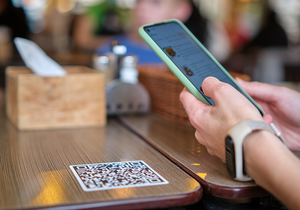

QR codes aren’t new—but boring ones are everywhere. If your sticker just says “Scan Me” in tiny Arial on a white square, it’s giving "do not disturb" energy. A QR sticker should be eye-catching, useful, and maybe even kind of fun.
Let’s break down how to create QR stickers people actually want to scan—from designs that draw attention to ideas that keep ‘em engaged to ways to work them into your marketing without being, well, lame.

Design Tips to Make QR Stickers Scan-Worthy
You can have the best promo, playlist, or loyalty link in the world—but if your sticker looks like it was whipped up in MS Paint at 2 a.m., no one’s going to scan it. Here’s how to make your QR code sticker actually work.
Use color and branding.
Plain black-and-white codes are fine… if you're printing shipping labels. But QR stickers? Go bold. Use your brand colors, add icons, drop in your logo—make it pop off the surface and feel like part of your vibe, not an afterthought.
Add a message that makes people curious.
“Scan Me” is fine, but you’ve got options. Try lines like:
- “Touch here for Internet magic”
- “Bet you won’t scan this”
- “Definitely not a trap”
- “Scan to win bragging rights”
Even if there’s no prize, that playful tone adds just enough curiosity to earn a scan.
Shape it up.
Stickers don’t have to be boring squares. A die-cut shape that matches your product or brand (hello, little juice bottle silhouette!) adds a layer of fun and helps the sticker stand out.
Leave breathing room.
Crammed codes don’t scan well. Give your QR some space, and don’t shrink it to microchip size unless you want people awkwardly leaning in with their phone like they’re cracking a safe.
Choose the right material.
Stickers on tables, walls, windows, or even gas pumps need durability. Go with vinyl for that long-haul life. Paper labels are better for indoor, low-cost, high-volume stuff—but if you’re trying to make a lasting impression or weather the outdoors, stick with the good stuff.

Creative Ideas for Where to Link Your QR Code
Let’s be honest—nobody’s scanning a QR just to land on your homepage. Give ‘em something worth the tap.
Menus, product catalogs, or online order forms.
Running a café or selling at a festival booth? Link to your full menu, your Etsy shop, or a form to place custom orders. Easy for them, and less repeating yourself for you.
Giveaways and exclusive offers.
Everybody loves free stuff. Use your QR sticker to link to a contest entry or a discount code. Place it on the front door, freezer case, or table tents—anywhere eyeballs linger. “Scan for a surprise” adds a little mystery that makes people curious.
Get more reviews (without begging).
Make it easy for happy customers to leave feedback by linking straight to your Google or Yelp page. Stick the code on your counter, window, or register area with a simple ask like “Got 20 seconds? Tell us how we did.”
Brand vibes, delivered digitally.
Share your Spotify playlist, a behind-the-scenes video, or a “meet the team” page. It’s unexpected and fun—and it makes your brand feel more like a person than a business.
Newsletter signups or loyalty rewards.
Let them scan, sign up, and get rewarded. Great for events, promo giveaways, or just making your storefront work a little harder. Add a line like “VIPs scan here” to make it feel exclusive.

How to Use QR Code Stickers in Your Marketing
It’s not just about what the code does—it’s where and how you use it. Here’s how to bring QR stickers into the real world and make them work for your brand.
On restaurant tables or bar tops.
Perfect for drink menus, event calendars, or tipping apps. Durable vinyl stickers hold up to spills and wipes, and they stay stuck between rounds. Great for giving customers info without slowing down your staff.
On storefront windows or entry doors.
Have a new app? A giveaway? A discount? Stick a QR on your front window that people can scan on their way in (or while they’re waiting for a latte). Pro tip: use bold colors so it doesn’t just blend into the glass.
At events, festivals, or markets.
You’re busy slinging merch—your sticker can work the crowd. Drop a QR on your display that links to your full catalog or signup form. That way, people who are “just browsing” can still follow up later… or sign up for a special deal while they wait in line.
In high-traffic, everyday spots.
Think outdoor places where people are already standing around with their phone—bus stops, bike racks, outdoor seating areas, even gas pumps. These are underrated sticker real estate. A bold QR with a message like “Scan to Save” can turn a boring wait into a quick brand connection.
Printing QR Stickers That Actually Work
Before you print a thousand stickers and slap them everywhere, double check:
- The QR code works on multiple devices and angles (yes, test it sideways)
- It’s big enough to scan without someone going nose-to-sticker (we recommend a minimum of 1” x 1”)
- The link is short, clean, and not likely to expire in a week
- The material fits the job (vinyl = durable, paper = short-term and budget-friendly)
Bonus tip: If you want to track performance or change the destination later, use a dynamic QR code platform. Static codes = permanent link. No take-backs.
Want QR stickers that actually get scanned?
Don’t waste your cool idea on a boring sticker. Whether you’re driving traffic, running a promo, or just want people to hear your weird playlist, we’ve got the materials, shapes, and fast shipping to make it happen. Design your own custom qr code stickers in minutes with our super nifty tool, get instant proofs, and leave the printing to us.
FAQs
How big should my QR code sticker be?
Start with at least 1” x 1” if it’s being scanned up close. Go bigger for windows, signs, or anything viewed from a distance.
What surfaces work best for QR stickers?
Smooth, flat ones: glass, plastic, metal, clean wood. Avoid placing them on anything too curved or textured unless the code is big and clear.
Can I track how many people scan it?
Yup. Use a dynamic QR code generator with tracking built-in to see scans, devices, and general location info.
Do clear or holographic stickers scan well?
They can—but only if there’s good contrast and no glare directly on the code. We recommend printing a white background behind the code to prevent glare issues.
Can I update the QR code’s link later?
Only if you used a dynamic code. Static QR codes are like tattoos—once printed, they’re forever.
- Tags: Stickers
- Nashira Edmiston